sli.do/#sodo42
Jak dostarczyć tanią i autoskalowalną infrastrukturę GitLab CI developerom
SysOps/DevOps Warszawa MeetUp #42 - 27.06.2019
Marcin Jasion
DevOps Engineer @ 
Daniel Król
DevOps Engineer @ 
sli.do/#sodo42
Pytania
Nie będziemy opowiadać jak tworzyć poprawnie pipelien`y

sli.do/#sodo42
Ale opowiemy jak wyjść na przeciw pytaniom developerów:
- Dlaczego tak wolno się buduje?
- Dlaczego tak długo czekam na rozpoczęcie budowy?
sli.do/#sodo42
Definicje
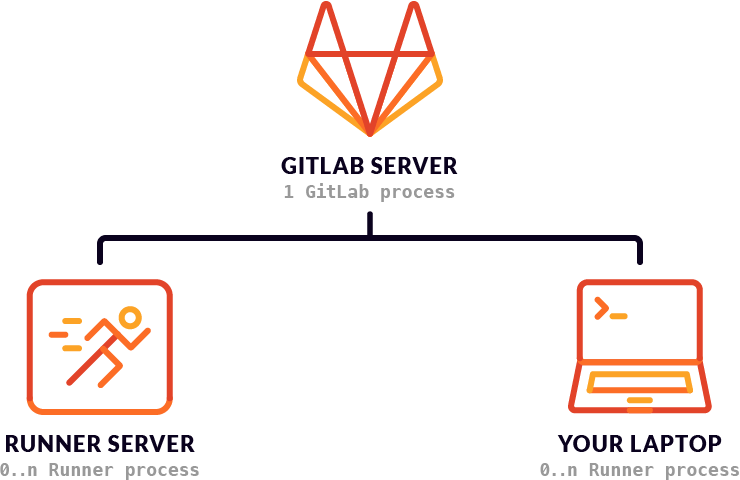
Gitlab Server
- Repozytoria Git
- Issue tracker
- Web IDE
- Build Pipeline
- i wiele innych
Gitlab Runner
Job

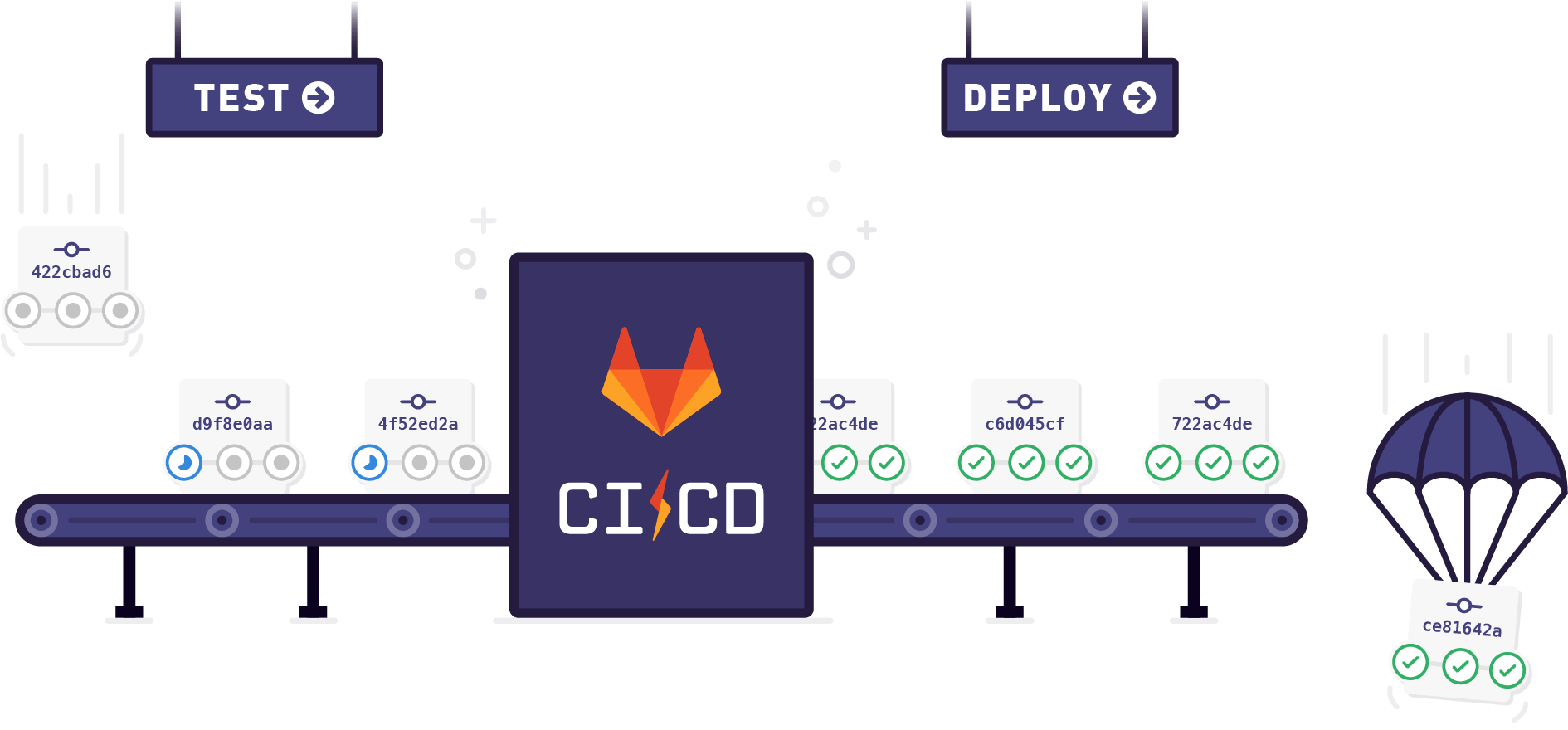
Stage
Pipeline

image: busybox:latest

stages:
 - Test
 - Build
 - Deploy

Testing Job:
  stage: Test
  script:
    - echo "Do a test here"
...
Runner
Running with gitlab-runner 12.0.0 (ac2a293c)
  on docker-auto-scale ed2dce3a
Using Docker executor with image busybox:latest ...
Pulling docker image busybox:latest ...
Using docker image sha256:64f5d945efcc0f39ab11b3cd4ba403cc9fefe1fa3613123ca016cf3708e8cafb for busybox:latest ...
Running on runner-ed2dce3a-project-12761917-concurrent-0 via runner-ed2dce3a-srm-1560021094-2b21faca...
Initialized empty Git repository in /builds/autoscaling-gitlabci/presentation-gitlab-ci-pipeline/.git/
Fetching changes...
Created fresh repository.
From https://gitlab.com/autoscaling-gitlabci/presentation-gitlab-ci-pipeline
 * [new branch]      master     -> origin/master
Checking out 3a7d772f as master...

Skipping Git submodules setup
$ echo "Do a test here"
Do a test here
Job succeeded
Jak działa Runner
- GitLab parsuje plik .gitlab-ci.yml by zebrać listę Job`ów do wykonania
- Runnery odpytują o dostępne Job`y
- Runnery pobierają dane potrzebne do wykonania Job`a
- Runnery komunikują się przy pomocy API
GitLab nie zarządza który runner ma wykonać Job!
GitLab "informuje" jakie zadania są do wykonania
Architektura odwrotna, niż w Jenkins
W jaki sposób uruchamiane są Joby
Zależnie od skonfigurowanego executora
Docker Executor
- Najprostszy w konfiguracji
- Każdy job odpalany jest w kontenerze
- Executor może wykonywać wiele jobów równolegle(kontener💪)
- Nie ma konfliktów portów między odpalonymi Job`ami
- Kontenery po zakończeniu są kasowane
- Każdy Job na start zawsze ma taki sam "czysty" stan
- Dodatkowe usługi(np. bazy danych) muszą zostać uruchomione w oddzielnych kontenerach
Serwisy w GitLab CI
- Docker (Docker in Docker)
- Bazy Danych np. Postgres
- wiele innych
Pozostałe executory
Shell
- Klasyczny Jenkins Slave
- Odpala skrypt bezpośrednio na maszynie
- Jeden Job wpływa na inne Joby(otwarte porty, zapisane pliki)
- Zależności do wykonania Job`a muszą być zainstalowane na maszynie wcześniej
Kubernetes
- Trochę inny Docker executor
- Każdy Job jest odpalony jako Pod
- Serwis jest odpalony w tym samym podzie:
- Komunikacja po localhost
- Trzeba pamiętać o nadpisaniu zmiennych środowiskowych
DOCKER_HOST: tcp://localhost:2375Docker Machine
- Docker Server jest instancją w chmurze
- Docker CLI łączy się z instancją po TLS
Docker Machine
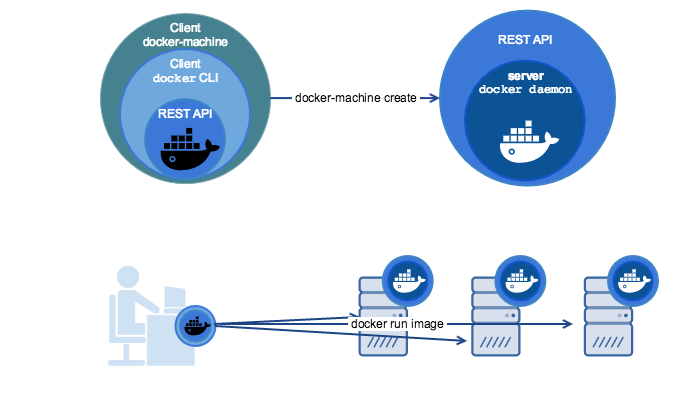
[marcin:~] $ docker-machine create \
                    --driver amazonec2 my-machine
Creating CA: /home/marcin/.docker/machine/certs/ca.pem
Creating client certificate: /home/marcin/.docker/machine/certs/cert.pem
Running pre-create checks...
Creating machine...
(my-machine) Launching instance...
Waiting for machine to be running, this may take a few minutes...
Detecting operating system of created instance...
Waiting for SSH to be available...
Detecting the provisioner...
Provisioning with ubuntu(systemd)...
Installing Docker...
Copying certs to the local machine directory...
Copying certs to the remote machine...
Setting Docker configuration on the remote daemon...
Checking connection to Docker...
Docker is up and running!
To see how to connect your Docker Client to the Docker Engine running on this virtual machine, run: docker-machine env my-machine
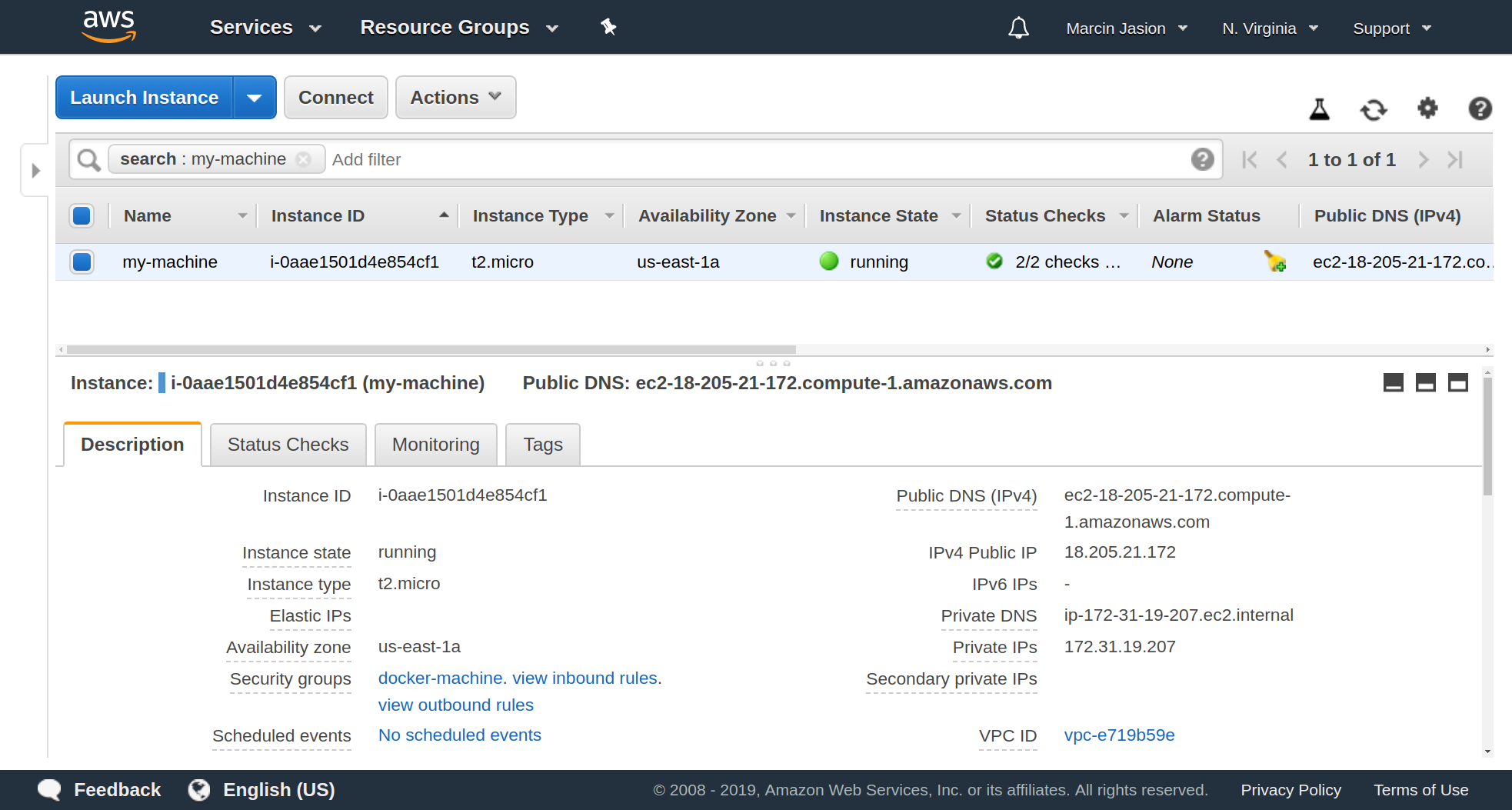
[marcin:~] $ docker-machine env my-machine
export DOCKER_TLS_VERIFY="1"
export DOCKER_HOST="tcp://18.205.21.172:2376"
export DOCKER_CERT_PATH="/home/marcin/.docker/machine/machines/my-machine"
export DOCKER_MACHINE_NAME="my-machine"
# Run this command to configure your shell:
# eval $(docker-machine env my-machine)
[marcin:~] $ eval $(docker-machine env my-machine)
[marcin:~] $ docker run -it alpine
/ # apk add curl -q && curl ifconfig.co
18.205.21.172
Docker Machine wspiera
- AWS
- Azure
- DigitlOcean
- Google Cloud
- VMware
- Openstack
- i 10 innych
Dla każdej chmury można skonfigurować parametry
amazonec2-private-address-only
amazonec2-region
amazonec2-vpc-id
amazonec2-subnet-id
amazonec2-security-group
amazonec2-instance-type
engine-storage-driver
amazonec2-root-size
amazonec2-request-spot-instance
amazonec2-spot-price
Nie trzeba się ograniczać do jednego typu instancji!
A to wszystko zarządzane z jednego runnera
Tagi w Jobach
Testing Job:
  stage: Test
  tags:
    - c5.2xlarge
  script:
    ...
AWS Spot Instances
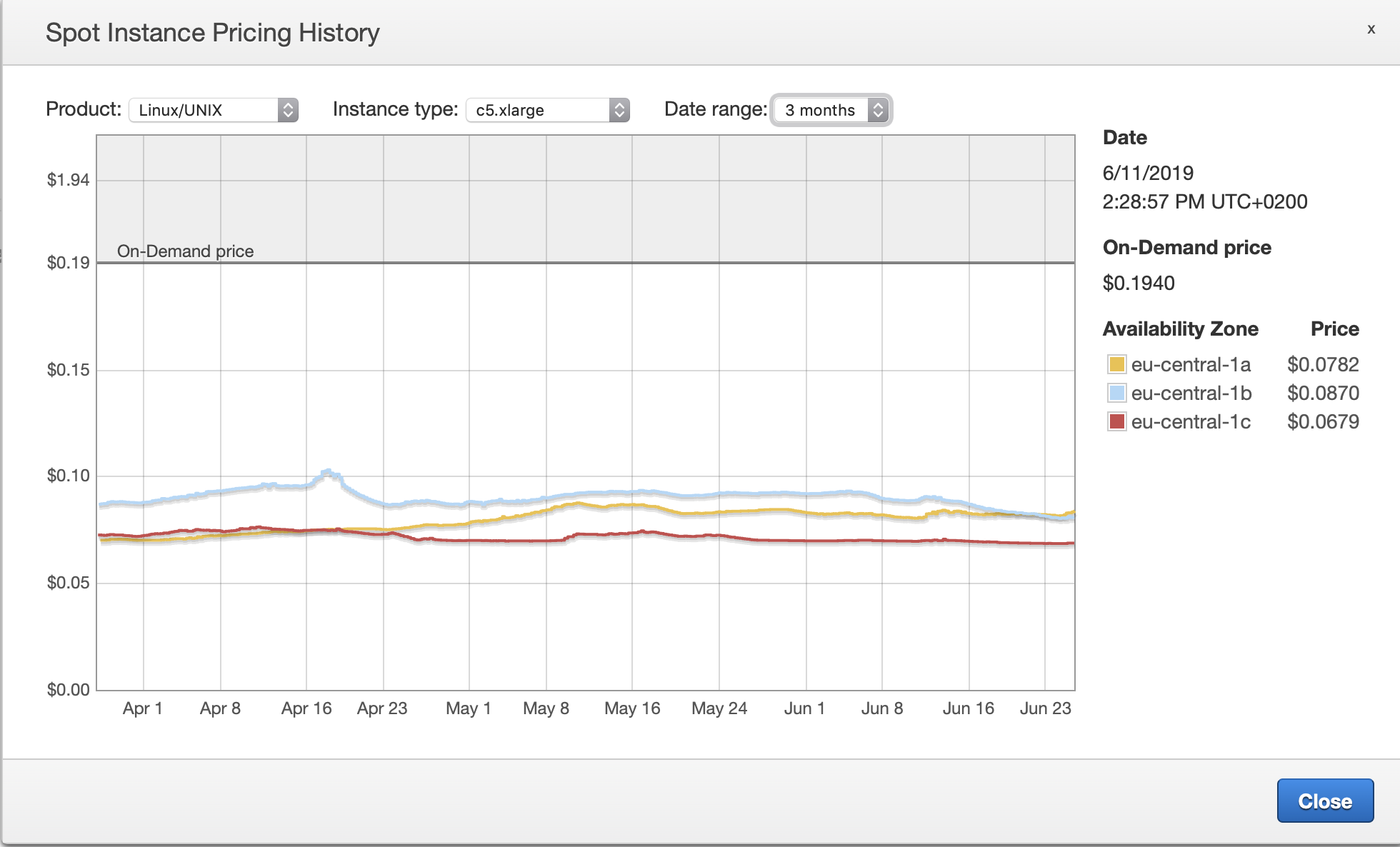
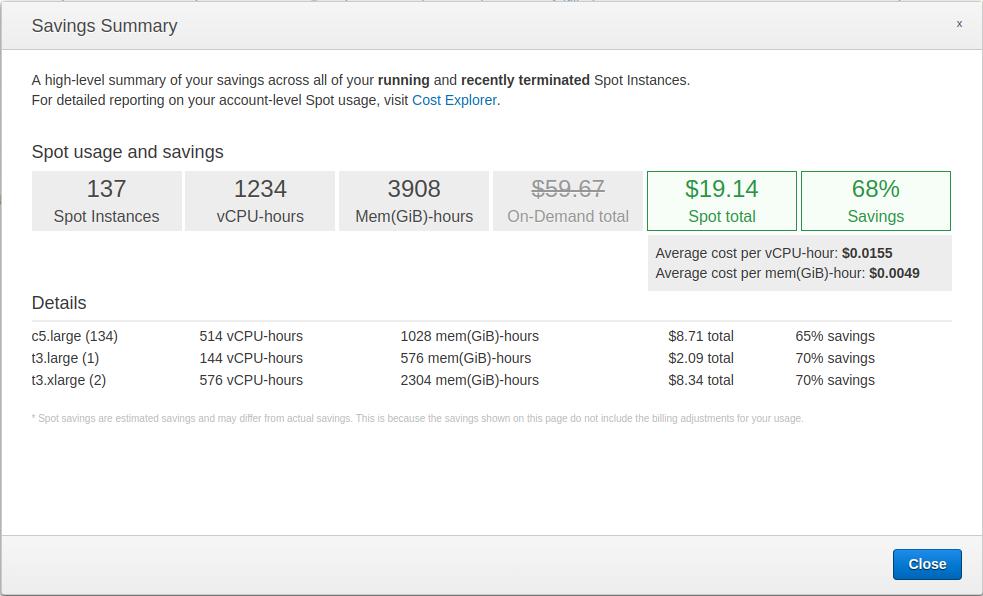
Tanie!
Możliwość rozliczenia sekundowego
Mocne instancje za ułamek normalnej ceny
Niestety, jak to bywa na wyprzedaży, ma ona swój regulamin
i instancja może zostać nam zabrana 😞
I co wtedy?
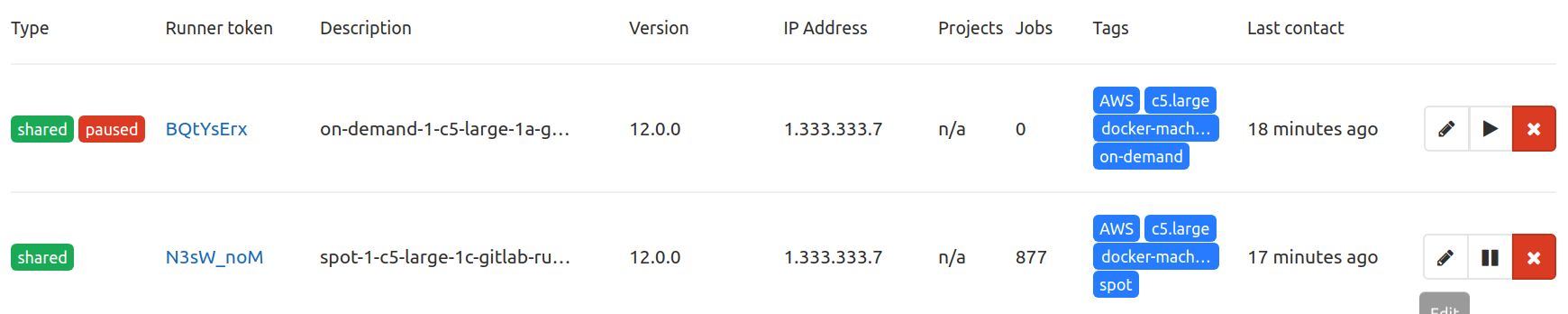
Korzystaj z Cache
- Shared Cache
- Docker Registry Cache
Autoskalowanie
Parametry autoskalowania
- Idle Count
- Idle Time
- Max Builds
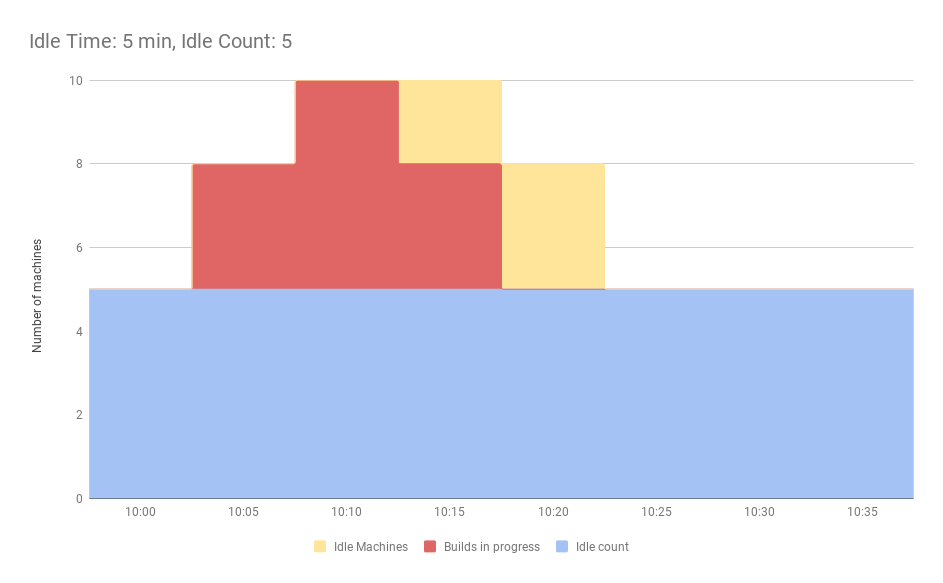
A żeby to nie chodziło w nocy
- Off Peak Periods(CRON)
- Off Peak Idle Count
- Off Peak Idle Time
- Off Peak Max Builds
Demo
Idle time: 30 seconds
Sposoby wdrożenia
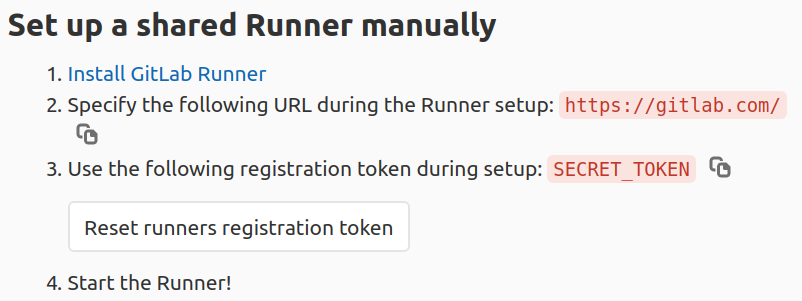
Command line
$ gitlab-ci-multi-runner register \
      --non-interactive \
      --url "https://gitlab.example.com/" \
      --registration-token "PROJECT_REGISTRATION_TOKEN" \
      --executor "docker" \
      --run-untagged="true" \
      --locked="false" \
$ gitlab-ci-multi-runner run
Puppet
Konfiguracja przy pomocy parametrów w puppet, który wykonuje polecenie register
class { 'gitlab_ci_multi_runner':
    version        => '11.10.0',
    concurrent     => '10',
    metrics_server => ":9252",
  }

  gitlab_ci_multi_runner::runner { "aws-c4.xlarge":
    gitlab_ci_url            => 'https://gitlab.example.com',
    tags                     => ['aws', 'aws-c4.xlarge'],
    limit                    => 8,
    output_limit             => 10485760,
    run_untagged             => true,
    token                    => hiera('gitlab-runner-token'),
    executor                 => 'docker+machine',
    locked                   => false,
    docker_image             => 'docker:latest',
    docker_volumes           => ['/var/run/docker.sock:/var/run/docker.sock'],
    docker_privileged        => true,
    cache_type               => "s3",
    cache_s3_server_address  => "s3.amazonaws.com",
    cache_s3_access_key      => hiera('aws-access-key'),
    cache_s3_secret_key      => hiera('aws-secret-key'),
    cache_s3_bucket_name     => "gitlab-runners-cache",
    cache_s3_bucket_location => "eu-west-1",
    cache_s3_cache_path      => "cache",
    cache_cache_shared       => true,
    machine_idle_nodes       => 0,
    machine_idle_time        => 300,
    machine_machine_driver   => "amazonec2",
    machine_machine_name     => "gitlabci-c4.xlarge-%s",
    machine_machine_options  => [
      "amazonec2-access-key=${::hiera('aws-access-key')}",
      "amazonec2-secret-key=${::hiera('aws-secret-key')}",
      'amazonec2-private-address-only',
      'amazonec2-tags=CostCenter,gitlabci',
      'engine-storage-driver=overlay2',
      'amazonec2-region=eu-west-1',
      'amazonec2-instance-type=c4.xlarge',
      'amazonec2-vpc-id=vpc-l33t',
      'amazonec2-subnet-id=subnet-l33t',
      'amazonec2-zone=b',
      'amazonec2-root-size=42',
      'amazonec2-request-spot-instance',
      'amazonec2-spot-price=0.3',
      'amazonec2-security-group=docker-machine-scale',
      'amazonec2-use-private-address',
      'amazonec2-userdata=/home/gitlab_ci_multi_runner/gitlabci-runner-cloudinit.sh'
    ],
Chef / Salt / Ansible
Wszystkie sprowadzają się do owrapowania wywołań komendy:
gitlab-ci-multi-runner register ...Helm
Nie ma jeszcze docker-machine
Merge request: charts/gitlab-runner!109
Co warto też zmienić
- CONCURRENT - Limit Jobów całego hosta
- LIMIT - Limit Jobów konkretnego runnera
- OUTPUT_LIMIT - tu ustawcie dużo, zawsze się przyda
- RUN_UNTAGGED - Czy budować joby bez taga
Czy każdy może postawić swojego runnera i odpalać dowolne joby?
Nie.
Aby dodać runner potrzeba podać token
Poziomy dostępności runnerów
- Shared - dostępne dla wszystkich projektów w GitLab
- Group - dostępne dla danej grupy projektów
- Project - dostępne tylko w konkretnym projekcie
Czy GitLab runner jest łatwiejszy od Jenkinsa w utrzymaniu?
Tak.
Wykorzystywane są popularne rozwiązania, a nie pluginy od społeczności